Aug 05, 2024
Jagged Intelligence – Building a GPT with Personalised History Data Retrieval
“Jagged Intelligence” – These LLMs be super smart and super stupid at the same time.
Jagged Intelligence
— Andrej Karpathy (@karpathy) July 25, 2024
The word I came up with to describe the (strange, unintuitive) fact that state of the art LLMs can both perform extremely impressive tasks (e.g. solve complex math problems) while simultaneously struggle with some very dumb problems.
E.g. example from two… pic.twitter.com/3C7pCdBShQ
We recently launched Heimdall – a GPT that helps you access, analyze, and visualize your spending habits on Amazon, Uber, Instacart, Booking & Uber Eats.
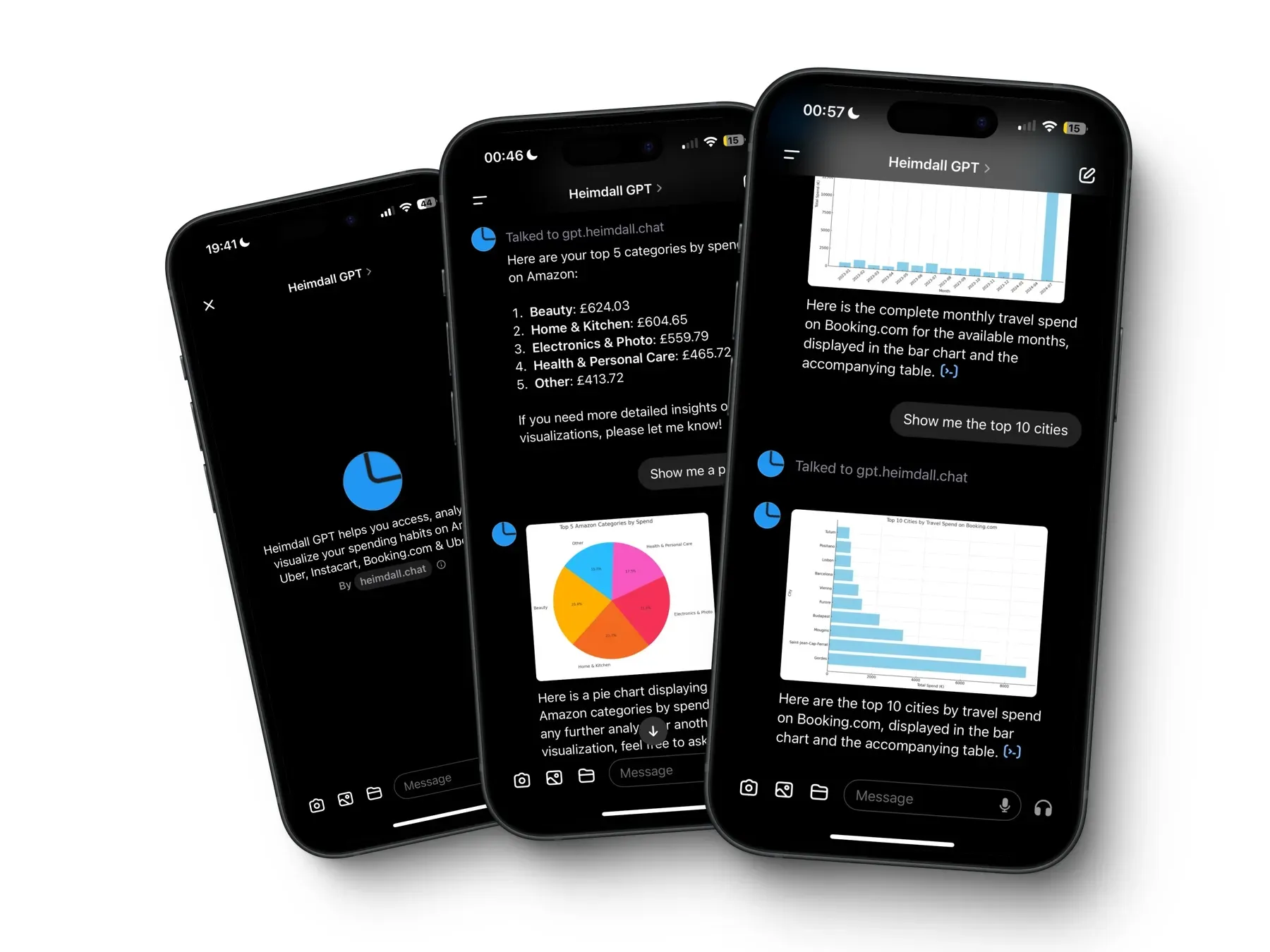
In building Heimdall, we frequently interacted with gpt-4o’s ‘jagged intelligence,’ navigating its complex strengths and surprising limitations.
This article outlines the challenges we faced as a result of jagged intelligence and the solutions we implemented to overcome them.
We also discuss on why we chose to build this chatbot as a GPT, the pros & cons of this approach and how we’re going to improve the bot going forward.
Spoiler: Heimdall v2 will not be a GPT.
How to build a GPT like Heimdall
GPTs are custom versions of ChatGPT that combine instructions, extra knowledge, and any combination of skills (by calling external APIs). Open AI provides some guidelines on how to do this + we also like this beginner tutorial.
In summary, there are three parts to building a GPT like Heimdall.
1. Instructions
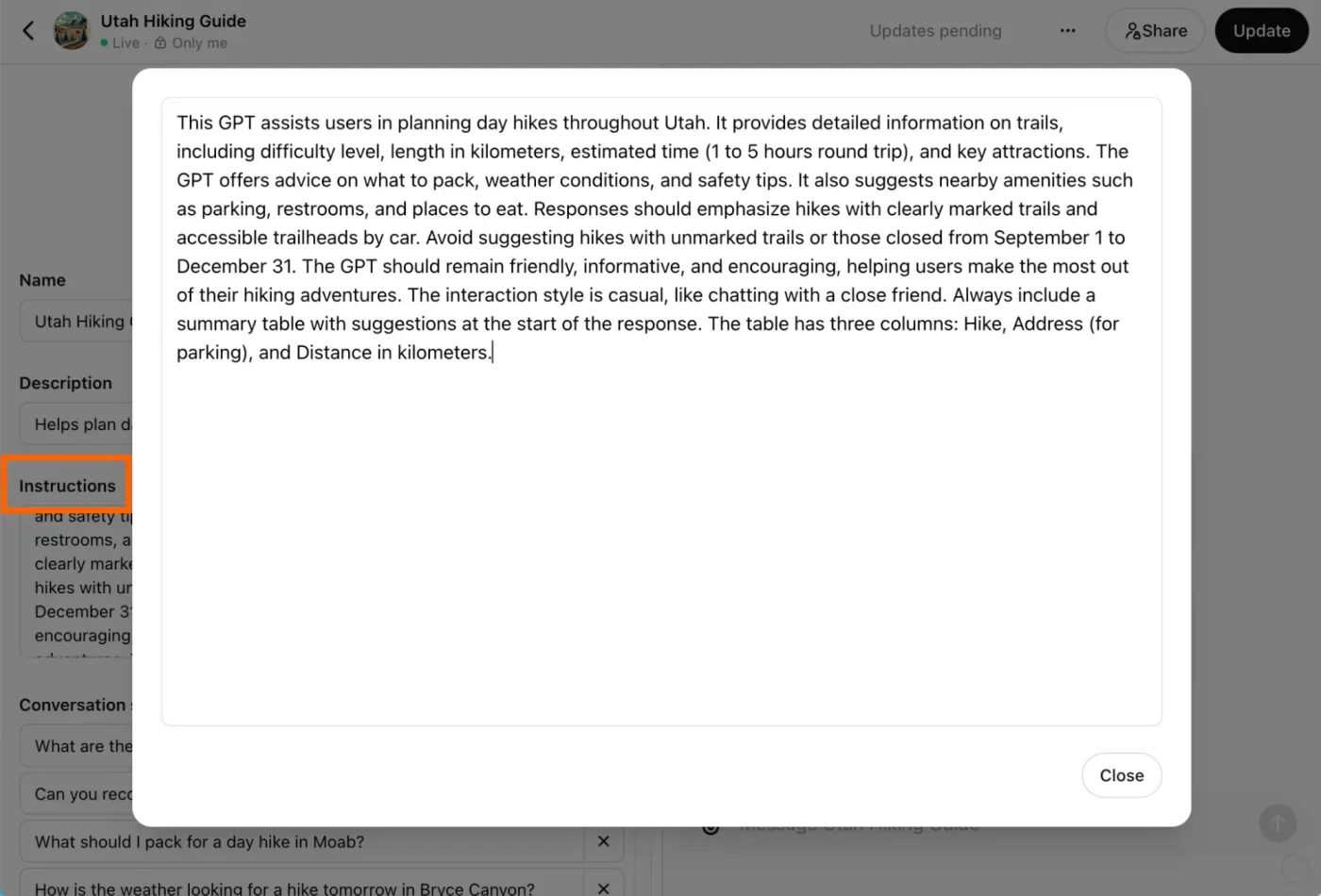
This involves “prompt engineering” — ideally, specifying clear guidelines & parameters that the GPT should follow, ensuring that it:
- Knows when to prompt the user to connect, share & update their data via Gandalf (more on this later).
- Understands how to retrieve and display data based on the user’s requests. Even when those requests aren’t particularly clear.
Open AI has some tips on how best to do this and as far as we know, they’re pretty effective.
2. Actions
If you want your chatbot to retrieve external information or take actions outside of the ChatGPT platform, actions are the way to go.
“GPT Actions empower ChatGPT users to interact with external applications via RESTful APIs calls outside of ChatGPT simply by using natural language.
They convert natural language text into the json schema required for an API call. GPT Actions are usually either used to do data retrieval to ChatGPT (e.g. query a Data Warehouse) or take action in another application (e.g. file a JIRA ticket).”
In our case, we used actions to give Heimdall the following abilities:
- Fetch the database schema in order to get necessary context on the available tables, columns and types. This is how the chatbot knows what questions it can ask the database and how to structure the eventual SQL query.
- Retrieve the user’s active connected data sources + the data range of the available data. This helps the chatbot figure out whether to prompt the user to connect a data source or refresh their connection to retrieve the latest data. This action/endpoint also contains relevant information like the User’s ID & the default currency per data source.
- Execute [read-only] SQL queries against the database to get the insights that the user is interested in.
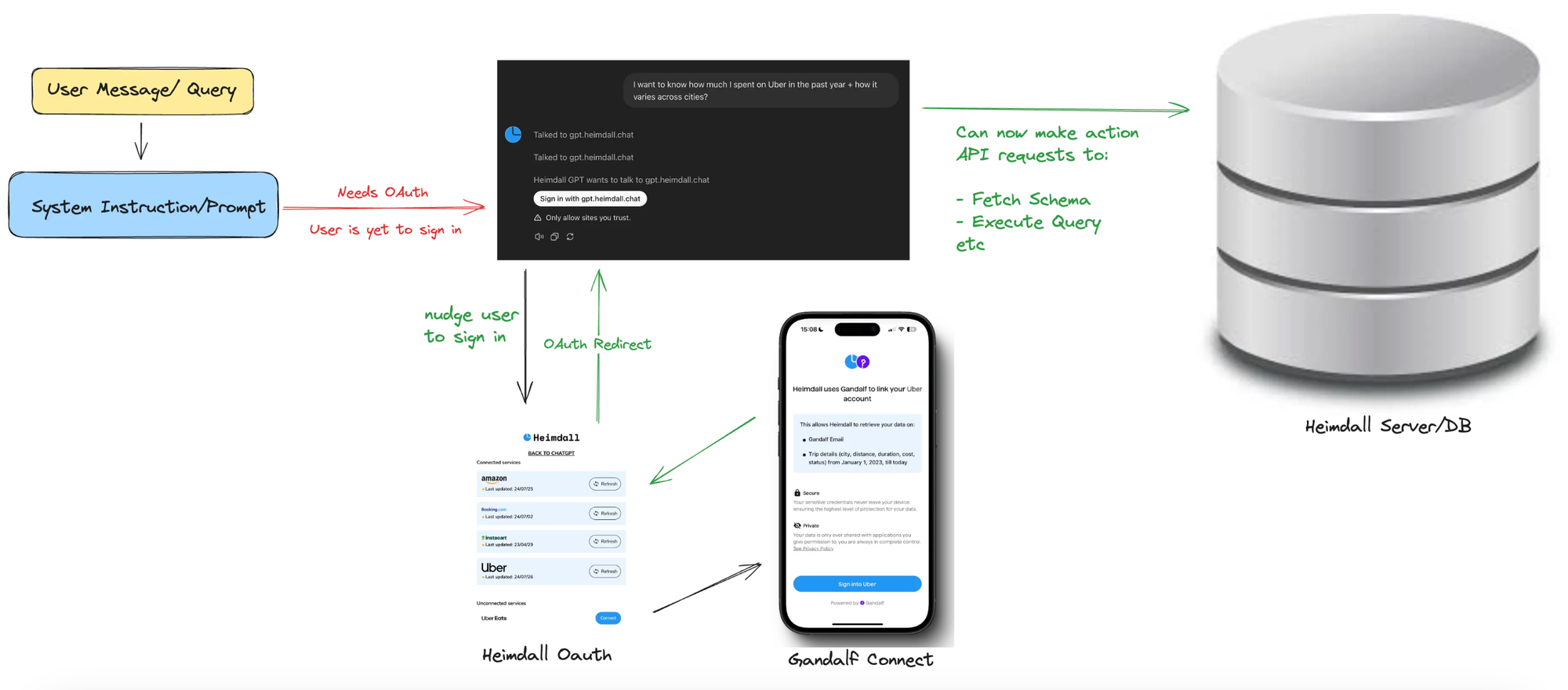
You can also configure your Actions to be authenticated, either via an API Key or OAuth. OAuth is ideal for our use-case because we need a way to identify which specific user we’re to retrieve data for.
End-users will need to “Sign in with Heimdall” to link their Uber, Amazon etc data with the GPT, so it can perform queries on the user’s behalf.
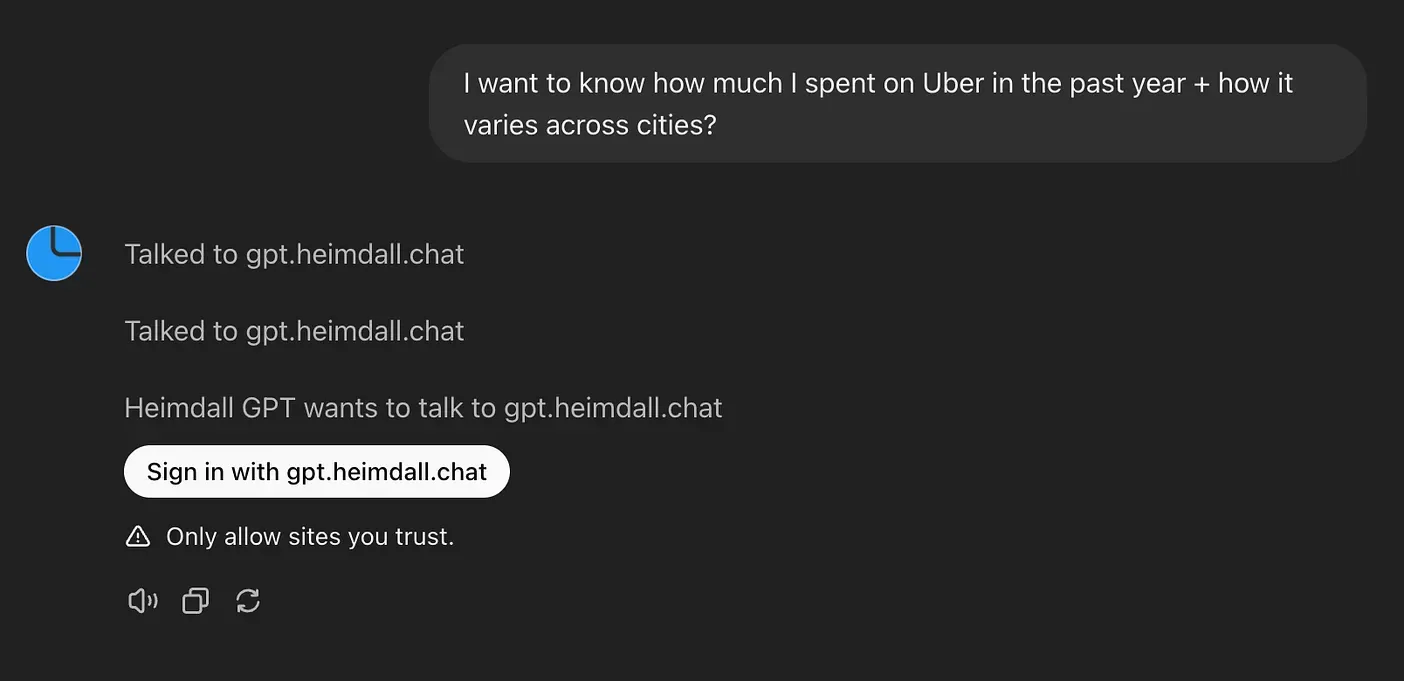
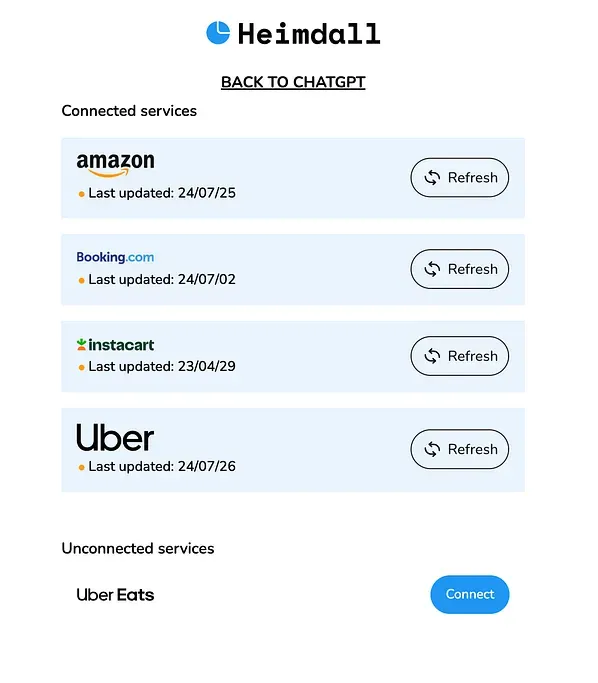
Sign in with Heimdall OAuth.
After the user has gone through the OAuth flow, and has returned to ChatGPT, every action API request made to the Heimdall server will contain an OAuth token that will be used to identify said end-user.
3. Gandalf SDK
Gandalf is an SDK that lets you securely request user data from sources like Amazon, YouTube, Instacart, Uber, and more. It’s the magic sauce that makes Heimdall possible in the first place, alongside the monumental technological miracle that is the LLM, of course..
As part of the authentication process, the end user is prompted to connect their data sources via Gandalf’s Connect.
Bringing it all together
Here’s an overview of how all the moving parts above work together.
Challenges & Solutions
Challenges with Jagged Intelligence
We initially thought we just needed to pull all the end-user data from Gandalf, store it in clearly named tables and columns, and expose the schema to the LLM.
We had tables like amazon_activities, uber_activities, etc. that contained details on every single [successful] transaction the user has carried out.
With our detailed system instructions and the database schema, we assumed that GPT-4o and the Code Interpreter could do the following:
1. Handle multiple currencies. Every row of user data contained explicit currency information. We instructed the chatbot to always GROUP BY currency to handle scenarios where a user, for example, uses Uber in different cities across the world. Despite many variations of the system instruction:
- It very often just ignored the instruction to expect multiple currencies and
GROUP BYaccordingly. - Instead, it would assume that all records are in a single currency and treat them as such.
Solution: We solved this class of problems by completely abandoning the attempt to have the LLM “reason through” multiple currencies directly.
- Instead, we identified the user’s most frequently used currency for each data source and converted all other transactions into this “default” currency for each source.
- This allowed us to expose only the default currency per data source [per user] to the LLM, ensuring it doesn’t need to handle multiple currencies within the same data source.
2. Easily calculate frequencies, sums and averages over time with SQL (vs using the Code Interpreter). We expected that if you asked it for your daily Amazon spending for the past week, it would know to create an SQL query using using SUM and GROUP BY.
Instead, it would always retrieve every. single. transaction. and try to analyze them in Python with the Code Interpreter. This was unnecessarily slow and often failed midway when processing a large number of transactions.
Solution A (Spoiler: it didn’t work): We initially attempted to resolve this by creating additional statistics tables. We had tables for daily_statistics, weekly_statistic, monthly_statistics and so on. Each of these tables contained frequencies, spending sums for every day, week and month respectively
They also included statistics for groups of transactions, such as product categories on Amazon and Instacart, cuisines on Uber Eats, and cities for Uber.
Sidebar: We had to build a few categorisation Open AI assistants to accomplish some of these categorisations. LLMs are great at this.
This way, the chatbot should be able to easily answer questions like
- “What kind of food did I spend the most on this month?”. Answer: Thai Food)
- “In which city did I use Uber the most, last year?”. Answer: London.
…and so on.
The (weekly) statistics table looked a little like this:
- user_id, transaction_count, total_spend
- week (i.e the week’s date range), year (i.e 2024)
- source (i.e amazon, instacart, booking, etc)
- filter_type (i.e category, city, meal_type, cuisine etc) and filter_value
- daily_average_transaction_count, daily_average_spend
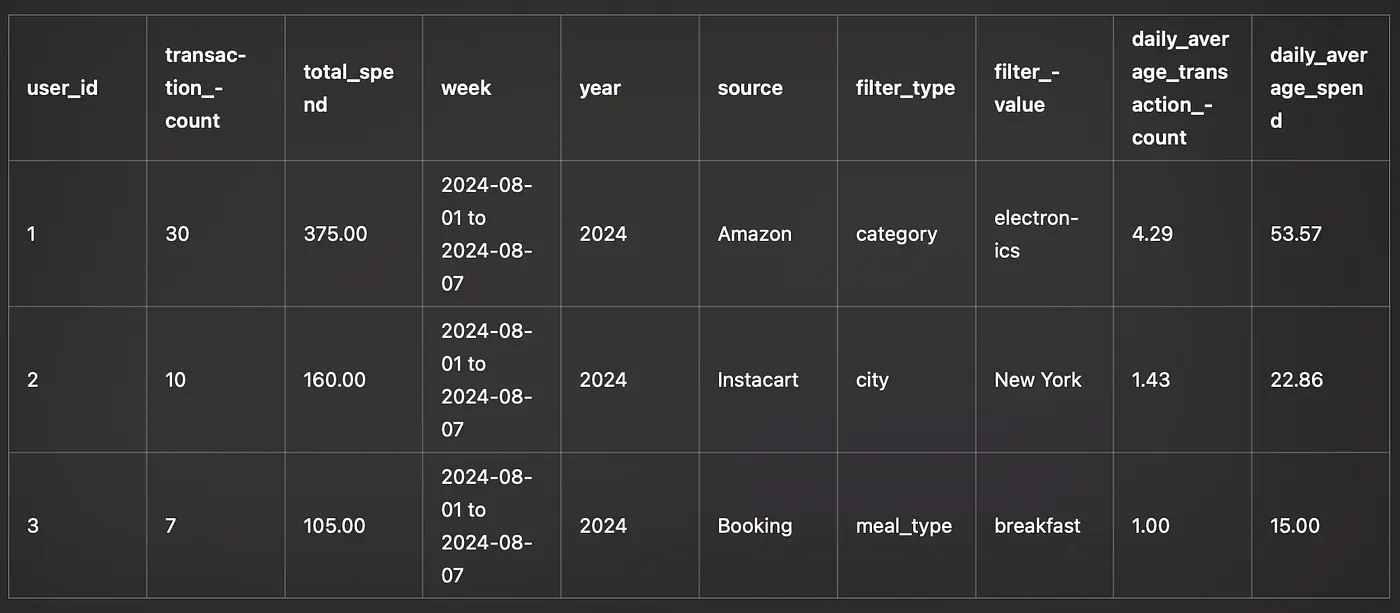
With the above columns, we expected the LLM to be able to answer any question about any time period by creating a simple SQL query.
For example, to find out how much the user spent on Uber across cities, in February, it should generate an SQL query like this.
SELECT
    filter_value AS city,
    SUM(total_spend) AS total_spent
FROM
    monthly_statistics
WHERE
    user_id = '123e4567-e89b-12d3-a456-426614174000'
    AND source = 'Uber'
    AND filter_type = 'city'
    AND month = 'February'
    AND year = 2024
GROUP BY
    city
ORDER BY
    total_spent DESC;
The LLM still struggled in the following ways:
- Likely because of the existence of the activity tables mentioned above (
amazon_activities,instacart_activitiesetc), it struggled toSELECT FROMthe appropriate_statisticstable. If you asked it to give me some weekly Amazon spending insight, it would fail toSELECT FROMtheweekly_statisticstable. Instead, it would pull data fromamazon_activitiesand attempt to perform the necessary mathematics using the Code Interpreter. - When it didn’t make the mistake above, it had a hard time using the
filter_typecolumn to figure out insights across categories, cities, retailers and so on. Most of the time, the LLM refused to setfilter_type = 'city'(or whatever) to get the right answers. I have no idea why this was the case, and we tried to tweak the system instructions many times, to no avail.
Solution B: One solution would be to completely remove the _activities tables, since it was tripping up the LLM into “thinking” that amazon_activities is the best possible source of data for Amazon, despite the system instruction telling it to use the _statistics tables.
However, we wanted users to be able to ask Heimdall questions like “What did I buy last week?” — only the _activities tables could have granular information like this, so it was best to leave them alone. This proposed solution could not solve the issues the LLM had with filtering the data properly.
The working solution was crude, but it worked like magic. We realised that, the LLM heavily relied on table names to decide what SQL queries to generate. This makes sense, as LLMs are “language pattern matching” machines and cannot think logically — they only appear to think logically as a result of being really good at mimicking language.
We created individual tables for every single data source, statistic type and filter type. i.e:
amazon_categories_daily_statistics— held data on frequencies, transaction sums & averages per product category for every single day.amazon_categories_weekly_statistics— held data on frequencies, transaction sums & averages per product category for every single week.uber_cities_daily_statistics— held data on frequencies, transaction sums & averages per city for every single day.uber_eats_cuisine_weekly_statistics— held data on frequencies, transaction sums & averages per cuisine type for every single week.
…and so on and so forth. This led to A LOT of tables, at least 80 different statistics tables.
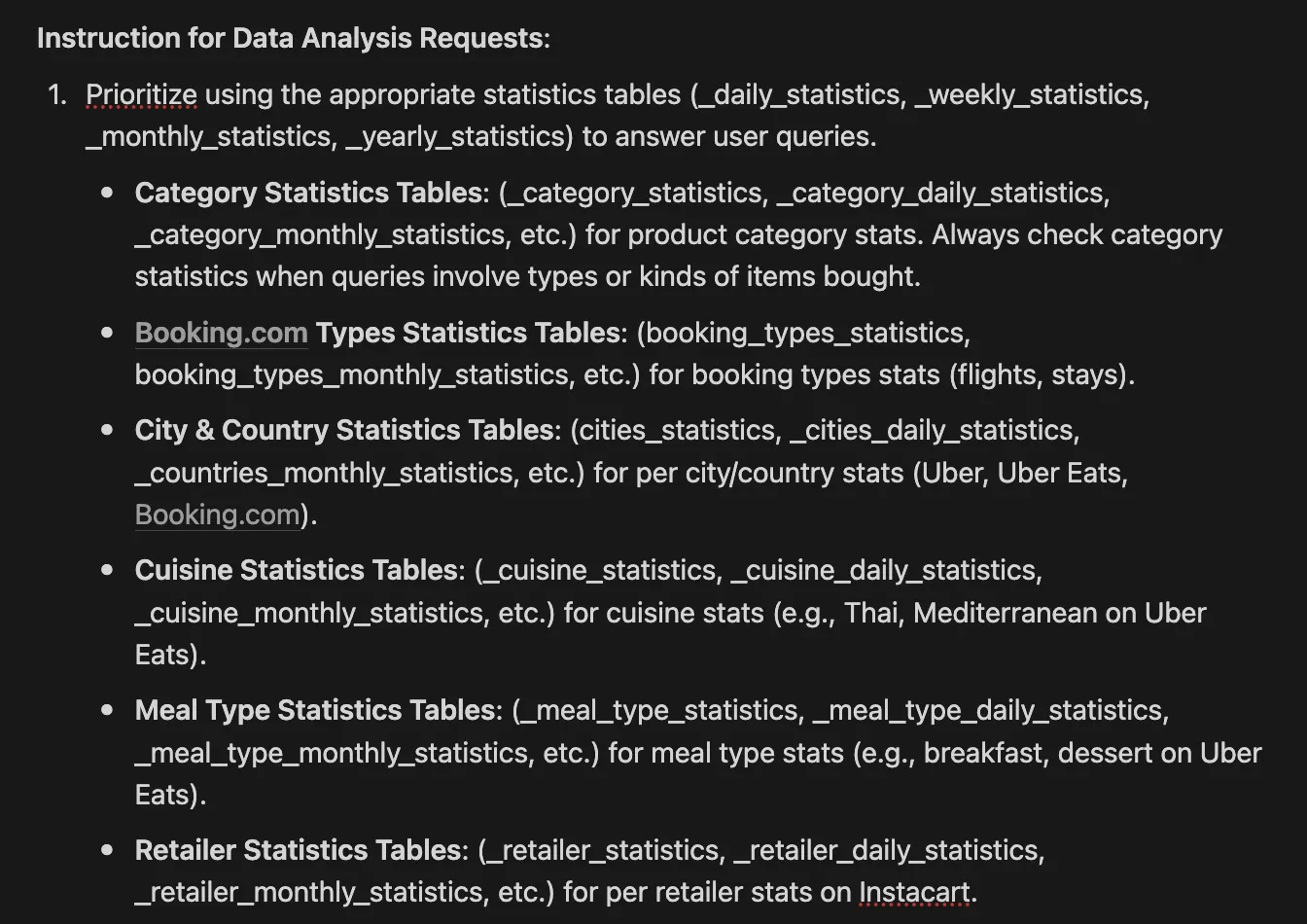
We combined it with the above tweak to the system instruction and it just worked.
Challenges with the Open AI GPT Platform
To my surprise, the most stressful aspects about building Heimdall was choosing to make it an Open AI GPT. This is especially because we can’t fix a good chunk of them ourselves.
We chose to build a GPT because:
$0 inference cost. With Open AI’s GPTs, inference is free for the developer. You don’t have to pay for input and output tokens — this is covered by the end-user’s ChatGPT free or Plus plans. This was likely the most compelling reason.
End-user familiarity. ChatGPT is by far the most used consumer chatbot — we thought that if Heimdall was part of the chatbot that users already talked to everyday, it would get far more use — with less of a learning curve.
We thought it would be easier and faster to build. We assumed that not having to worry at all about the user interface would greatly reduce the time it takes us to get to production. This was a largely correct assumption, but the time that was saved was not worth the worse user experience.
It sucked because:
The GPT constantly required end-user approval to talk to the Heimdall server. Even when the end-user selects “Always Allow”.
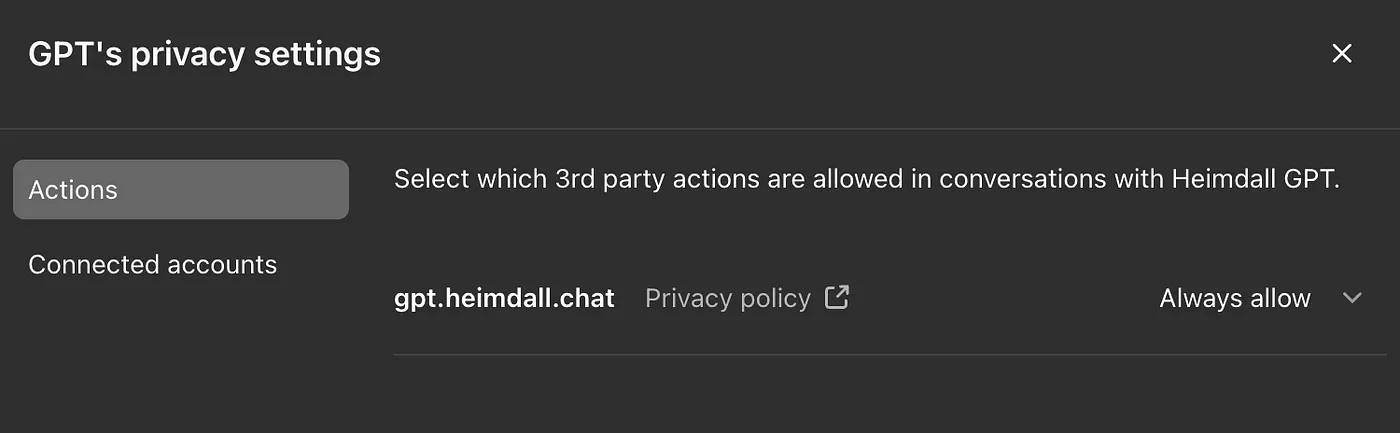

Having to always click “Confirm” after asking the an AI assistant a question is a bad experience.
The OAuth experience is not smooth, especially on mobile.
- It doesn’t work on the first try sometimes. But might work on the second try.
- Sometimes the user triggers it from the ChatGPT mobile app, but it redirects to the web app in their browser after OAuth is complete.
On desktop it generates links that don’t work. Whenever a user wanted to connect a new data source or push recent activity data, the GPT made an API request to an Action that responded with a link. This link was then presented to the user, directing them to the Heimdall connection screen.
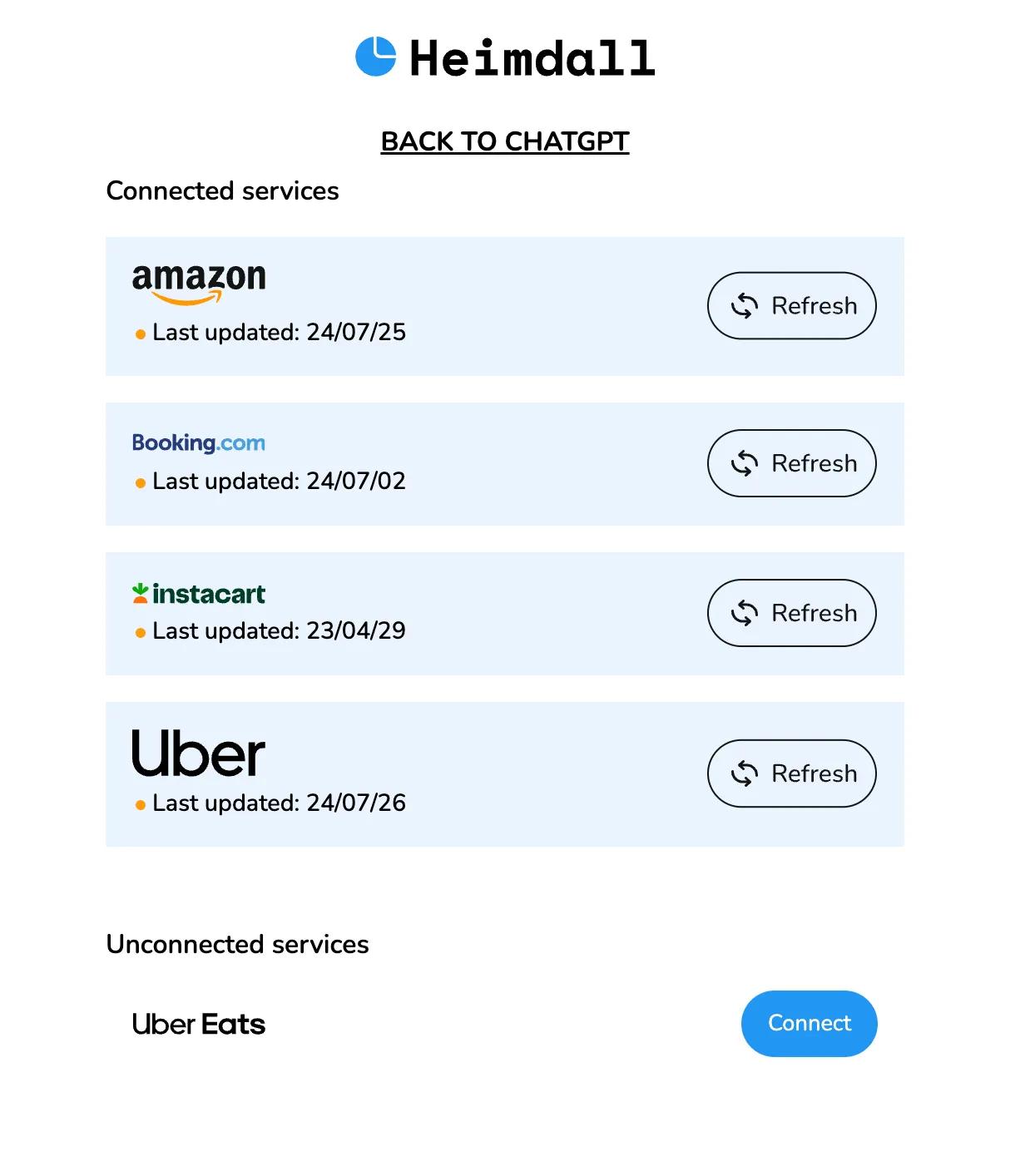
The links were never clickable on desktop but worked on mobile. To work around this, we instructed it to always present the URL as both a QR code (generated with matplotlib) and a clickable link.
Also, as far as we know, there’s no real way to redirect the user from your application to a specific conversation (outside the OAuth flow). The user would need to find that conversation themselves and inform the chatbot when they’ve completed the data update process.
Solution: We’re already building Heimdall v2 almost entirely from scratch, and it’s not going to be an OpenAI GPT. This should be out in less than two weeks.
Subscribe to our newsletter to get notified when this happens.
This time, we’ll be building with:
- Vercel’s AI Chatbot SDK: It’s an open source Next.js chatbot preconfigured to integrate into any LLM, complete & flexible UI (built with shadcn/ui), tool use and much more. This allows us to move quickly, without any of the constraints of Open AI’s GPTs, such as multiple confirmation requests, unclickable links, and OAuth difficulties.
- GPT-4o mini (via OpenAI’s API): We’re seeing strong evidence that GPT-4o mini is capable of replacing GPT-4o. It appears that all the optimisations we implemented, such as the verbose and numerous tables, actually “dumbed things down” for the LLM. While GPT-4o mini isn’t free inference — it’s as cheap as it gets (15 cents per million input tokens and 60 cents per million output tokens).
Challenges with Gandalf’s SDK
One major insight we gained while building Heimdall (and whoami.tv) is that we shouldn’t have had to calculate aggregate data, like user total spends across categories or cities, or their favorite genres on Netflix. These per-user aggregate statistics seem like a common requirement that should be integrated into Gandalf’s API, rather than leaving it up to each developer to figure out how to process this data efficiently and quickly.
Solution: This sprint, we’re integrating per-user aggregate stats into the Gandalf API. With a single API request, developers will be able to answer questions like:
- What’s the user’s average spend on “Health and Household” items on Amazon?
- Which YouTube channel did they watch most frequently last month?
…and similar queries.
We’re also integrating “expanded data” directly into the Gandalf API. Previously, developers had to rely on external APIs to obtain more information about the subject matter of end-user activities. For example, to find out the genre or cast of a TV show a user is watching or to pull detailed product information about something they bought on Amazon, developers needed another data source. In a few weeks, this will no longer be necessary.
Subscribe to our newsletter to get notified when this is live!
That’s all, folks. We’d love to hear your questions, suggestions for improvements, or even your own AI building stories.